What is Viam?
Viam is a software platform for building, deploying, and managing robotics applications.
With Viam, you declare the hardware and services you need in a JSON config. Viam installs the drivers and any additional software modules required to support your configuration. Vision, motion planning, and most other capabilities you need are built in or available in the Viam module Registry, all with well-defined APIs to support your use case. Application code versioning, deployment, and rollback are native to the Viam platform. It’s the development workflow you’re used to, applied to physical devices.
Viam brings software engineering practices to robotics: version control, remote monitoring and diagnostics, staged rollouts, and a registry of modules and models you can build on.
Viam fundamentals
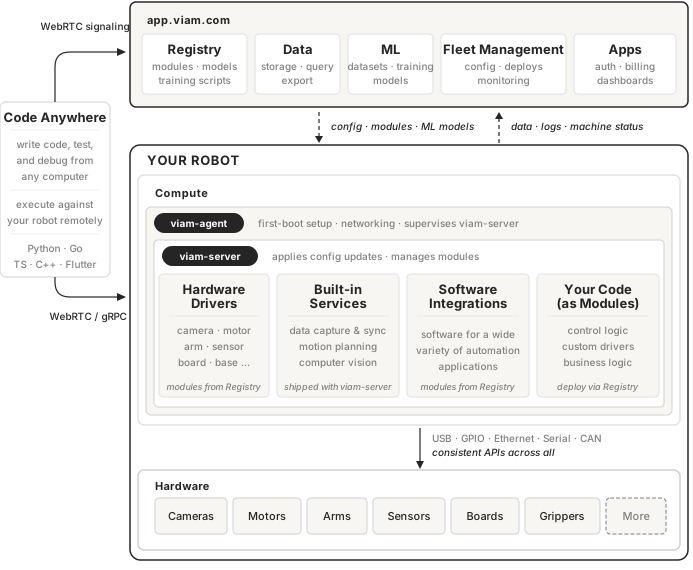
Every Viam machine starts with viam-agent.
Install it with a single command.
viam-agent installs viam-server, supervises it, and keeps it up to date.
viam-server is the core runtime.
It pulls your machine’s configuration from app.viam.com, fetches the necessary modules from the Viam Registry, launches required processes, and keeps them running to support all the hardware and services your application requires.
The Viam Registry is a central repository of modules, ML models, and training scripts maintained by Viam and the robotics community. All registry assets support semantic versioning, enabling controlled deployment to individual robots and across your fleet.
Registry modules provide drivers for cameras, motors, sensors, arms, and other hardware, plus services like object detection.
viam-server also includes built-in services such as motion planning and data management.
For machine learning, the Registry includes pretrained models for common tasks. You can also train and use your own models.
Viam supports reusable configuration through fragments. Define a combination of components, services, and modules once, then apply that configuration across any number of machines. Use fragments to configure a camera-arm combination, a camera-to-object-detection pipeline, or an entire work cell. Fragments support variable substitution and per-machine overwrites, so you can deploy the same base configuration to hundreds of machines while accommodating site-specific settings.
Viam capabilities
- Get hardware running in minutes: Add a camera, motor, arm, or sensor to your configuration with a few parameters.
viam-serverpulls the driver and exposes the device through a consistent API. No writing drivers, no managing dependencies. - Operate from anywhere: Connect to a machine over the network with no VPN or port forwarding. Stream logs, view live camera and sensor data, teleoperate, and see a 3D view of the machine, all from the browser.
- Capture data from edge to cloud: Configure which components to record and how often. Data syncs when bandwidth allows, queues locally when a machine goes offline, and can be filtered at the edge to control cost.
- Train and deploy models: Train machine learning models on captured data, or bring models from TensorFlow, PyTorch, or ONNX. Deploy them to your fleet and run inference on the device.
- Develop code remotely: Write code on your laptop and run it against machine hardware over the network. When you are ready, package it as a module for production.
- Manage software deployments: Package your control logic as a module and deploy it through the Registry. Pin machines to exact versions or allow automatic updates, and push new versions over the air.
- Scale easily: Apply one fragment to dozens or hundreds of machines, update them fleet-wide from a single change, override per-machine differences, and roll changes out or back incrementally.
- Productize with Viam apps: Build customer-facing web and mobile apps with the TypeScript and Flutter SDKs, add white-label authentication, and bill customers through Viam.
Next steps
We recommend putting these concepts into practice by following the Try Viam tutorial to build your first machine.
For more information on cloud capabilities like fleet management and provisioning, see Monitor Air Quality with a Fleet of Sensors.
Was this page helpful?
Glad to hear it! If you have any other feedback please let us know:
We're sorry about that. To help us improve, please tell us what we can do better:
Thank you!